

Running a coffee service business means dealing with far more than customer contact records. It involves managing machines that need regular maintenance, planning routes for technicians, ensuring consumables are replenished on time, and keeping service level agreements (SLAs) on track so customers get the reliability they expect.
The software you choose to run those operations can be the difference between staying ahead of customer expectations, or constantly playing catch-up.
In this guide, we’ll compare two popular CRM choices for coffee operators: Dobby and Salesforce. We’ll look at what each platform offers, how much customization is required, and how that impacts time-to-value, costs, and the KPIs that drive your business.
Salesforce vs. Dobby in a nutshell
Salesforce is a well-known, horizontal CRM. It’s powerful and flexible, but it wasn’t built with coffee and vending service operations in mind. To make it work, you’ll need to piece together multiple clouds (Sales Cloud, Service Cloud, Field Service), partner add-ons, and custom development.
Dobby, on the other hand, is a vertical operations platform designed specifically for operators who manage fleets of coffee and vending machines. It ships with the data model, workflows, and KPIs you use daily and is ready to go from day one.
Salesforce fits companies looking for broad CRM standardization. Dobby fits operators who want faster lift-off, fewer repeat visits, and a system that already “thinks” like their business.
Let’s get into the details between the two now.
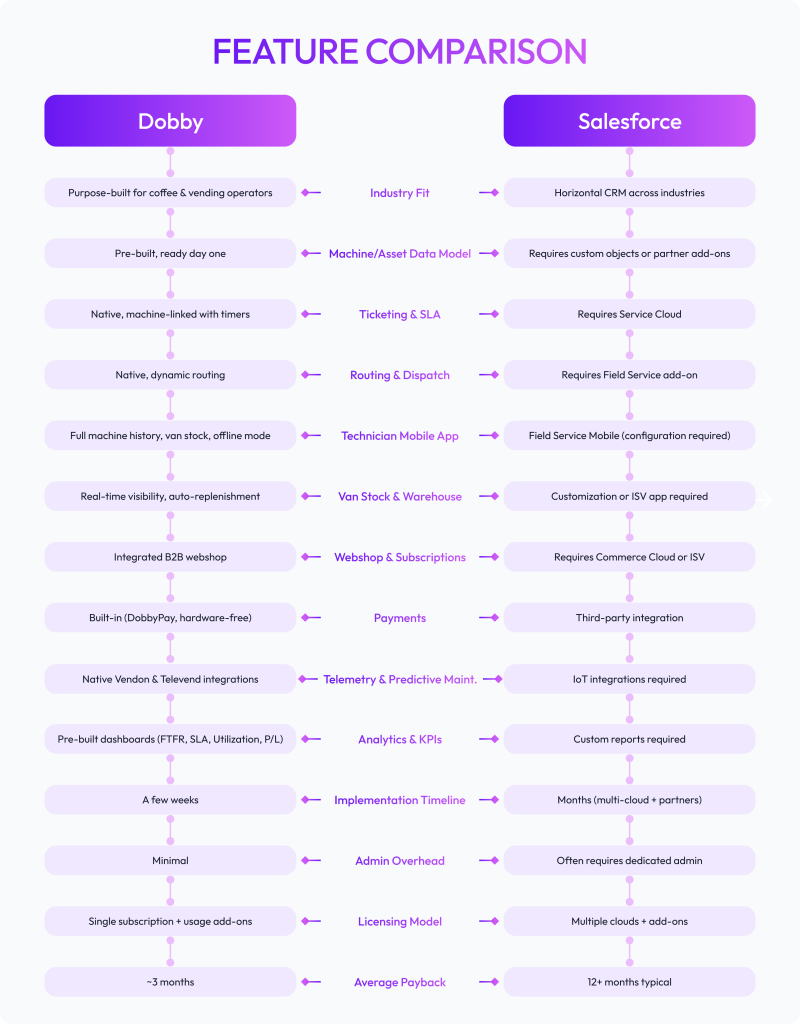
Dobby vs. Salesforce: Feature comparison
Time-to-value and implementation between Dobby and Salesforce
One of the core challenges of implementing any software is how much time it takes for your team to actually start using it. You don’t want to spend months wrestling with configurations before seeing any benefit.
That’s why implementation speed is such a critical factor for operators. The sooner the system is live, the sooner technicians, managers, and customers feel the difference. Here’s how Dobby and Salesforce compare:
Dobby:
With Dobby, you can import machines and customer data, set up roles, switch on routing, invite technicians, and you’re live in weeks. The webshop and payments are already integrated, so you don’t need to pause mid-rollout to add separate systems.
Salesforce:
You’ll scope out machine data as custom objects, select an Independent Software Vendor (ISV) partner for van stock, webshop, and payments, then fund months of partner development before your first ticket runs through the system. Even with experienced consultants, getting to first use typically takes months.
Total cost of ownership (TCO) you can actually forecast
Choosing software goes far beyond the headline license fee. Operators need to account for the full cost of running and maintaining the system over time. That includes the hours spent on implementation, the investment in training, the integrations required to connect different functions reliably, and the hidden administrative burden that grows with every extra module.
Here’s how Dobby and Salesforce perform when it comes to different hidden costs.
Licenses:
Dobby offers a single subscription with usage-based add-ons. That means you know exactly what you’re paying for, and you can model growth scenarios without surprises. Salesforce requires multiple clouds like Sales, Service, Field Service, and often additional ISV apps to cover basic functions like van stock or consumables ordering. Those costs stack up quickly.
Partner services:
Dobby can typically be rolled out with minimal external support, while Salesforce almost always involves upfront partner builds and ongoing change requests.
Admin overhead:
Admin overhead also looks different between the two platforms. With Dobby, service managers can run the system with light administrative effort. In Salesforce, it’s common to require at least one dedicated admin, sometimes a full team, just to keep workflows, permissions, and reports running smoothly.
Integration overhead:
Similar to admin overhead, you also need to consider the cost of integration. Dobby ships with vendor integrations to partners like Vendon and Televend, so telemetry and predictive maintenance are ready to use. In Salesforce, you’ll need to source marketplace apps and maintain them over time, which means more delays and higher costs.
Training & adoption:
And finally, training and adoption. With Dobby, everyone uses the same field app: technicians, managers, and back office staff all work from a single interface. This reduces complexity, shortens the learning curve, and helps teams get productive faster. In Salesforce, different roles often use different modules across clouds, which lengthens adoption time and increases the risk of errors in day-to-day operations.
Impact on operator KPIs and ROI: Dobby vs Salesforce
First-Time Fix Rate (FTFR):
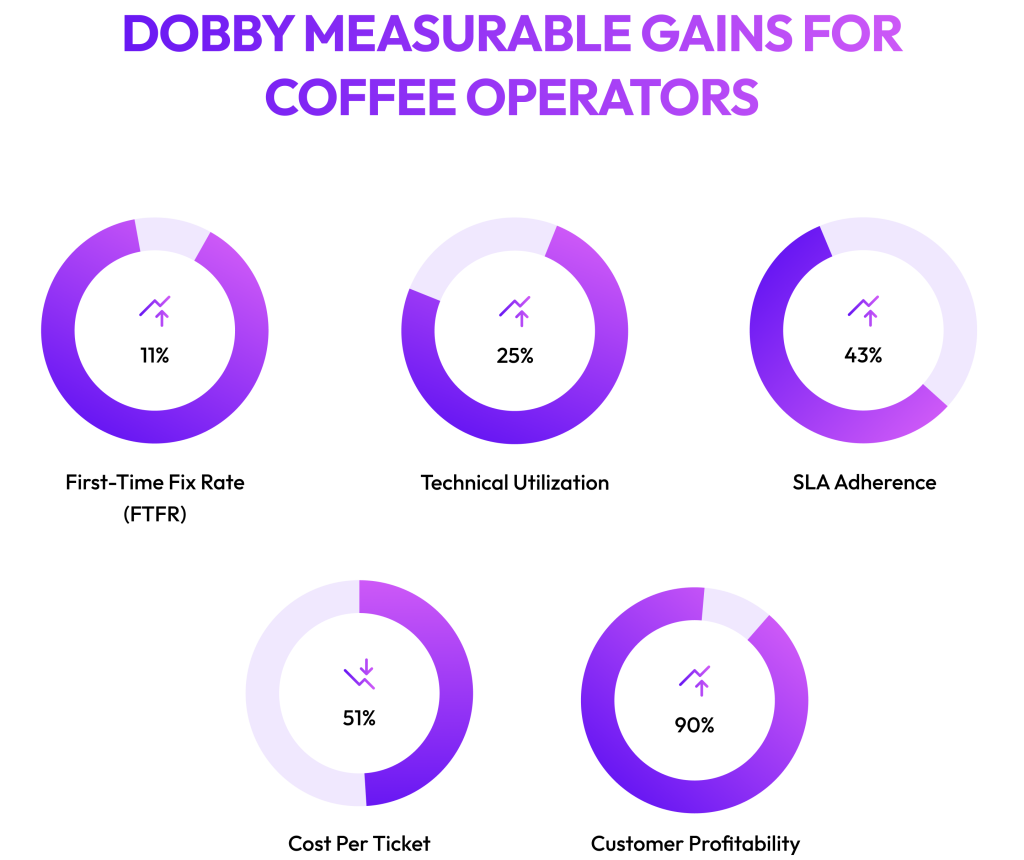
With Dobby, technicians arrive with full machine history, real-time parts visibility, and context from previous jobs. This means fewer repeat visits, up to 11% more operational efficiency, and more reliable service for customers. In Salesforce, reaching the same outcome requires significant configuration and extra modules.
Technician utilization:
Dobby’s routing engine reduces wasted drive time and balances workloads across the team, boosting technician productivity through field service optimization by up to 25%. In Salesforce, this level of optimization typically comes only after layering Field Service and add-ons.
SLA adherence:
Dobby includes timers and proactive scheduling tools out of the box, so managers can keep promises to clients without building custom reports. They can see up to a 43% reduction in SLA time. Salesforce can achieve SLA tracking, but only after setup and reporting adjustments.
Cost per ticket:
Dobby integrates dispatch, invoicing, and customer communication into one workflow, lowering the number of touches needed to resolve a job. This directly reduces cost per ticket and manual handling by 51%. Salesforce users often need to design and build workflows before reaching this level of efficiency.
Customer profitability:
Dobby consolidates service activity, webshop sales, and payments into one profitability view per customer or machine. This helps operators see which contracts drive margins and which drain resources. Salesforce, on the other hand, requires connecting several different systems before reaching the same insight.
With that in mind, it’s worth stepping back to consider the scenarios where Salesforce might still be the right fit.
When Salesforce might still be the right choice
You’re part of a multi-line enterprise standardizing on Salesforce globally.
You need highly bespoke workflows outside the coffee/vending model.
You have an in-house Salesforce admin team and want access to its large ISV ecosystem.
Why Dobby is the best CRM for coffee operators
This clarity translates into fewer repeat visits because technicians have the right information and parts before arriving.
Dispatch is faster and more accurate because routing is based on live data and technician skills.
Invoicing is seamless because service, webshop, and payments flow through one system.
And profitability is clearer because every service call, consumables order, and contract renewal is tracked in one place.
All of these improvements matter for customers too. They experience shorter wait times, more reliable fixes, transparent billing, and proactive service instead of reactive calls.
That’s why operators who adopt Dobby see up to 43% reduction in SLA time, 11% increase in operational efficiency, and 393% increase in net profit!
If your business runs on fleets of coffee and vending machines, the choice is clear: pick the platform built for your world.
Ready to simplify your billing and customer management?
See how Dobby can fit right into your workflow and help you achieve up to 393% increase in net profits.
Vendor questions checklist
Which features are native vs. require add-ons or partners?
How long from contract to first routed job?
How do you handle van stock and replenishment?
Can technicians access full machine/service history offline?
What telemetry integrations exist today, and what’s on the roadmap?
Can customers subscribe to consumables in the same system?
How do you calculate FTFR and technician utilization out of the box?
How much admin headcount is needed to run the stack?