If you’re running a coffee service business, you’re probably managing fleets of machines, service agreements, routes, spare parts, consumables, and the profitability of each account.
Amidst all this, the software you choose can have a direct impact on how efficiently you operate, how fast your team responds, and how satisfied your customers stay.
That’s why many operators evaluating their next system ask: Should we adopt a horizontal platform like Microsoft Dynamics 365, or go with an industry-specific solution like Dobby?
In this guide, we’ll break down both options so you can make a pragmatic, informed decision for your business.
Dynamics 365 vs Dobby: In a nutshell
Dynamics 365:
A flexible CRM/ERP platform that can manage field service, invoicing, supply chain, and commerce. But to make it work for coffee operations, you need to combine several modules like Sales, Field Service, Finance, Commerce, and invest in a partner to customize them for machine-based service.
Dobby:
An end-to-end operations platform built for service businesses that manage coffee and vending machines. Out of the box, Dobby gives you the workflows, KPIs, and technician tools you need without a long configuration project.
Detailed feature comparison table: Dobby vs Dynamics 365
Choosing the right system comes down to how well it handles the daily work of running a coffee service operation. Below, we break down how each platform supports the core tasks coffee operators deal with every day.
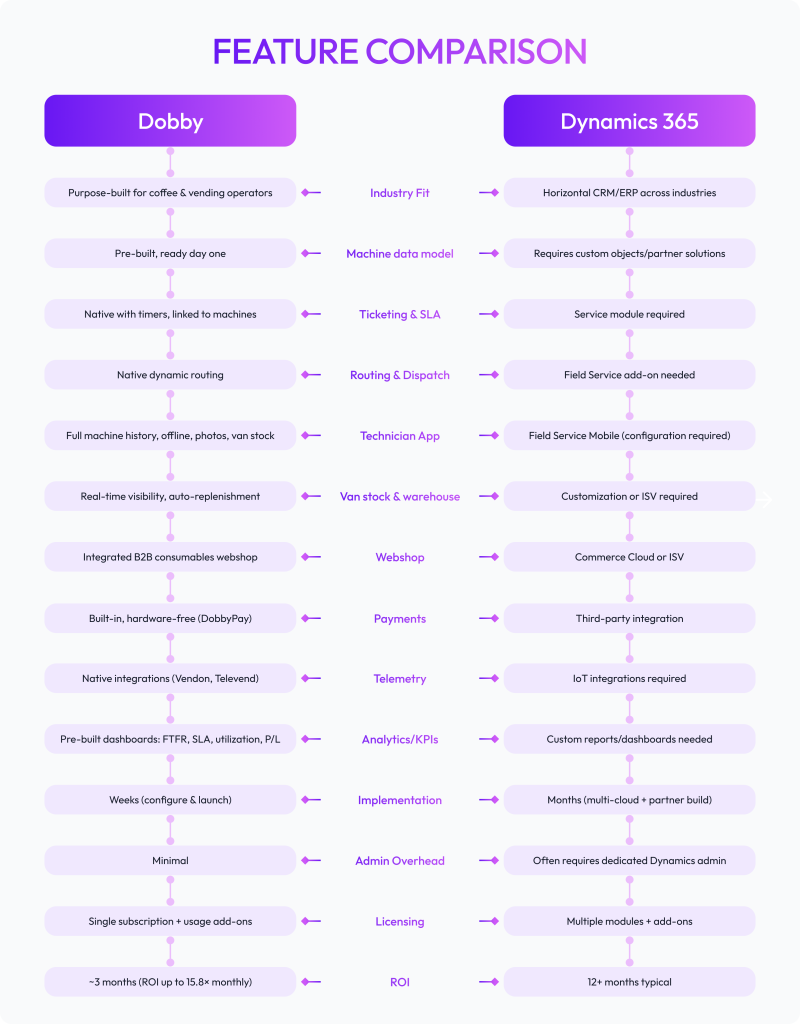
From the table, the takeaway is clear: Dobby is ready to support coffee operators from day one, while Dynamics demands extra time and customization.
Here’s a look at the differences between the two for a few core categories.
Time-to-value & implementation: How each performs
One of the core factors to consider (and what most businesses often overlook) is how long it takes before your team can actually use the software.
A system that drags on for months can drain energy, delay improvements, and affect the ROI. While one that goes live quickly builds momentum and trust.
Dobby:
Dobby helps you import your machine and customer data, configure routes, set up your webshop, and invite technicians. Most operators that use Dobby are up and running within weeks.
Dynamics 365:
To get started with Dynamics 365 as a coffee operator, you’ll need to plan a partner project, choose ISVs for webshop and payments, define custom objects for machines and van stock, and run months of testing before rollout.
For operators already stretched thin with manual planning, every extra month of waiting pushes back service improvements and strains both staff and customers.
Because the sooner a system is live, the sooner your technicians have better tools in hand, managers see clearer data, and customers feel the difference. That’s why faster time-to-value is one of Dobby’s biggest advantages.
And here’s how we do it step-by-step to make sure you’re live within weeks, while also supporting you through the onboarding process.
Understand
Setup
Development
Training
Refine
Go Live
Total cost of ownership (TCO) you can actually forecast
Licenses:
Dobby runs on a single subscription. Dynamics requires multiple modules and add-ons, each billed separately.
Partner services:
With Dobby, most of the heavy lifting is built in. Ticketing, routing, webshop, and payments don’t require a separate partner to configure. That means you can go live without long scoping workshops or expensive consulting hours. Dynamics, on the other hand, often depends on large upfront customization projects and recurring consulting support.
Admin overhead:
Dobby is designed to run lean. Operators can manage updates, workflows, and user access themselves through a single dashboard without needing a specialist. In contrast, Dynamics usually needs a dedicated administrator or even a small team to maintain modules, updates, and integrations.
Integration tax:
Dobby includes prebuilt integrations for telemetry, payments, and webshop. Here too, Dynamics requires extra ISVs from the marketplace plus ongoing maintenance.
Training & adoption:
Dobby gives technicians one app with everything built in. Dynamics splits functions across multiple apps, making adoption slower and more complex.
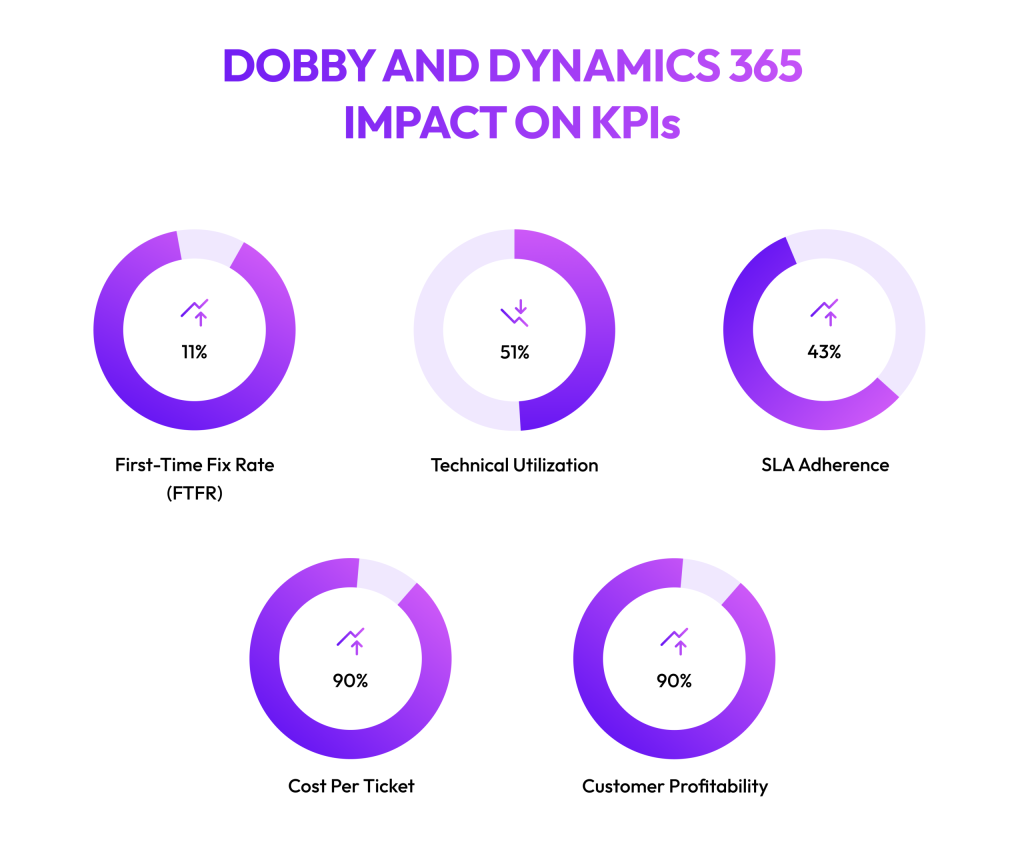
Dobby and Dynamics 356: Impact on KPIs
This is the most pressing question coffee operators have when comparing or even considering implementing a CRM.
Because at the end of the day, the right system should improve your numbers. And should give you a good return on investment. Here’s how Dobby impacts the KPIs that matter to service managers and managing directors:
First-Time Fix Rate (FTFR):
This measures how often technicians resolve issues on the first visit. With Dobby, technicians have machine history, van stock, and routing intelligence at hand. This information improves their operational efficiency by 11% as compared to generic CRMs like Dynamics, which often requires configuration and custom dashboards to even track FTFR.
Technician utilization:
This shows how much of a technician’s time is spent on actual service versus driving or admin. With Dobby, coffee operators see up to 51% reduction in service calls because of reduced manual route routing. Dynamics can also optimize routes, but only with the Field Service module and an added setup
SLA adherence:
SLA adherence tracks whether service teams meet contracted response and resolution times. Dobby enforces SLAs with built-in timers and proactive scheduling, reducing SLA time by up to 43%. In Dynamics, this depends on configuring the Service module and building custom workflows.
Cost per ticket:
This KPI looks at the average expense of resolving each service request. Dobby reduces touches with integrated ticketing, invoicing, and webshop links, driving costs down. In Dynamics, fragmented modules mean costs per ticket can be harder to calculate and control.
Customer profitability:
Profitability by customer or machine helps directors see which accounts create value and which drain resources. Dobby provides this view natively by tying service, webshop, and payments into one dashboard. Dynamics can show profitability, but it usually requires custom reports and multiple integrations.
Net profitability and ROI: Where Dobby stands out for coffee service operators
Beyond the KPIs we discussed above, operators need to see the impact across the whole business.
Net profitability becomes a key metric here because it captures the overall health of the operation after service costs, consumables, and payments.
With Dobby, these gains come from connected workflows: service tickets automatically trigger billing, webshop orders flow straight into accounts, and payments reconcile without manual effort.
Companies like YellowBeard have seen a 368% increase in extra invoicing and a 393% increase in net profits after moving to Dobby. Case studies show Dobby can deliver ROI in as little as three months, with operators achieving up to 15.8× monthly return.
Dynamics can deliver these insights too, but only after configuring multiple modules, building custom reporting, and layering in third-party integrations, which slows down the ROI. And unlike Dobby, there are no published numbers that prove real ROI for coffee operators on Dynamics, so you’re left estimating rather than knowing what to expect.
When Dynamics 365 might still be right for coffee operators
Enterprises that need to enforce a corporate-wide CRM standard across different divisions.
Companies with heavily bespoke processes that extend beyond machine service.
Organizations that prioritize alignment with Microsoft’s full stack (Office, Azure, Power BI) for governance and compliance.
Why Dobby is the best CRM for coffee operators
For coffee service operators, success means keeping machines running smoothly, giving technicians the right tools to work efficiently, making sure customers stay satisfied, all the while keeping the company profitable.
That requires a system that connects service tickets, routes, parts, and payments into one clear workflow.
Dobby helps with this. On our platform:
Each machine has a complete profile (model, serial number, install date, contract terms, and SLA) and every ticket, part, and visit updates that record.
The technician app shows full history, guided checklists, photos, and current van stock, even offline.
Live telemetry from Vendon and Televend can open tickets, pre-pick parts, and schedule visits before failures.
Dashboards track FTFR, SLA performance, technician utilization, and P/L by customer or machine so managers can act in real time.
Dynamics can be set up to do many of these things, but only after stitching together modules and relying on partner-led builds that take months.
With Dobby, you get the essentials from day one, making it easier to cut repeat visits, speed up dispatch, streamline invoicing, and track profitability with confidence.
Ready to see how Dobby can fit your operations? Talk to our team and explore how quickly you can move from manual systems to a connected, profitable operation.