
When a coffee or vending operator starts thinking about changing CRMs, it rarely begins with a technical need. It usually starts with frustration.
Service tickets scattered across inboxes. Machine histories buried in spreadsheets. Technicians asking for information that should already be at their fingertips. Customers calling before your system alerts you.
If you’re reading this, chances are you’ve felt the weight of these gaps. And you know that the next stage of your growth will require more than patchwork tools.
This guide will help you understand what CRM migration means for coffee operators, why generic CRMs fall short, and how to move toward a coffee-native stack that supports your entire operation.
Let’s break it down step by step so you can plan your migration with confidence.
What is CRM migration?
CRM migration is the process of moving customer data, settings, and workflows from one Customer Relationship Management system to another. For most industries, this involves transferring contacts, leads, sales history, and reconfiguring the new system to match your business processes.
For coffee and vending operators, the story is very different.
A migration includes machine placements, service history, repeated faults, consumable usage, contract details, SLA rules, ticket logs, route patterns, and customer profitability.
This is why we view CRM migration as an operational reset. It’s the moment your business shifts from scattered information to a connected structure where service, stock, and sales finally speak the same language.
Read on to see why businesses do CRM data migration.
Why switch CRM systems?
Here are some of the most common reasons why service businesses switch from generic CRM to a coffee-service-specific CRM.
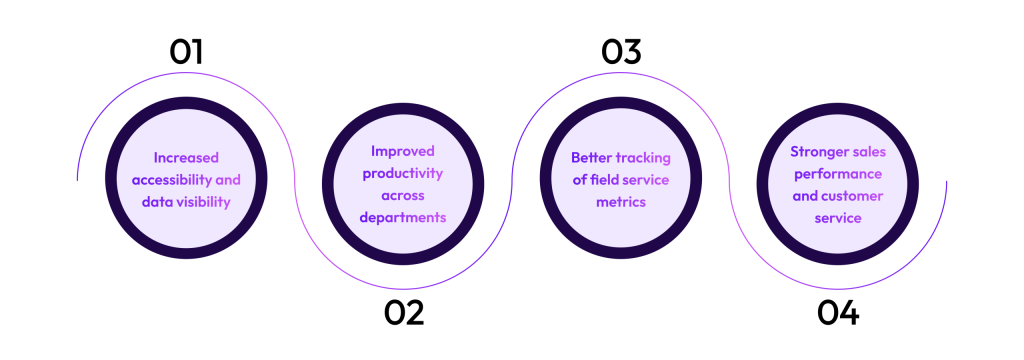
1. Increased accessibility and data visibility
2. Improved productivity across departments
3. Better tracking of field service metrics
4. Stronger sales performance and customer service
A connected CRM shows your sales teams what’s happening on the service side and helps service teams prepare better for jobs. Customers get faster responses, proactive communication, and fewer repeated issues.
Signs it’s time to migrate to a coffee-native CRM
Your team works from multiple spreadsheets and tools
Customer or machine data is often missing or outdated
Technicians ask for information they should already have
Sales and service teams don’t share a single source of truth
Reporting takes hours or relies on manual exports
CRM migration plan: Steps to follow for a smooth CRM migration
Migrating your CRM doesn’t have to disrupt operations. With the right structure, it becomes a controlled project that replaces chaos with clarity.
To do it the right way, let’s think of migration in three phases: Before, during, and after.
CRM migration strategy: What to keep in mind before
At this stage, your goal is to understand your current data and align your team around the move. A strong start here prevents issues later.
Audit your data:
Identify where every piece of information lives today. Go deeper by checking how up-to-date each source is, who maintains it, and how information flows between teams. This helps uncover hidden dependencies and gaps that will need attention during migration.
Clean and de-duplicate records:
Conflicting spreadsheets today become major issues after migration. Use this stage to standardize naming conventions, remove outdated machine entries, and resolve duplicated customer sites, especially where contracts and SLAs differ.
Talk to your team:
Involve technicians, sales reps, and back-office staff early. Their feedback is crucial because it's your team that will ultimately use the new CRM. Ask them where data breaks down, which tools they rely on, and what slows them down. Their insights will highlight workflow bottlenecks you’ll want to solve in the new CRM.
Map your data fields:
Define how machines connect to customers, tickets, and contracts. This is the backbone of a clean CRM. Mapping also reveals missing data you need to fill in, such as installation dates, machine types, and service-level rules.
Back up all your data:
Keep a clean archive. Save every source in a structured format so you can trace issues later.
What to do during a CRM migration
Test on a small dataset first:
Start with a controlled group of customers, machines, and tickets to verify that field mappings, relationships, and data formats behave as expected. Use this test to validate naming conventions, SLA logic, machine groupings, and ticket history structure.
Validate machine-to-ticket-to-customer connections:
For coffee operators, this is the most important part of migration. Every ticket should correctly attach to the right machine, and every machine to the right customer site. Confirm that service histories appear in the right order, that recurring issues remain connected to their machines, and that contracts/SLA timers apply correctly.
Keep teams fully operational:
Make sure they know where to log work temporarily. Provide a clear process for handling new tickets, updates, and customer communication during the transition. Communicate expected timelines and assign one internal point of contact for questions. This prevents data loss and avoids the operational slowdown that often happens when teams aren’t sure which system to trust during migration.
After migration: Train, monitor, optimize
Run cross-department training:
Each team needs to understand how to use the system and how it supports their day-to-day responsibilities. Technicians should learn how to access machine histories and log work efficiently, while sales teams should be trained on customer insights and account-level data.
Set up dashboards for key metrics:
Dashboards turn raw data into actionable insight so department leads can monitor trends and respond quickly. Over time, these dashboards help managers spot bottlenecks, track improvements post-migration, and maintain alignment across service, sales, and back-office teams.
Monitor workflows regularly:
Watch where tickets get stuck and refine processes. In the early weeks, you’ll notice patterns around which steps slow teams down or which fields need restructuring. Use these insights to adjust your workflows, permissions, or automation settings.
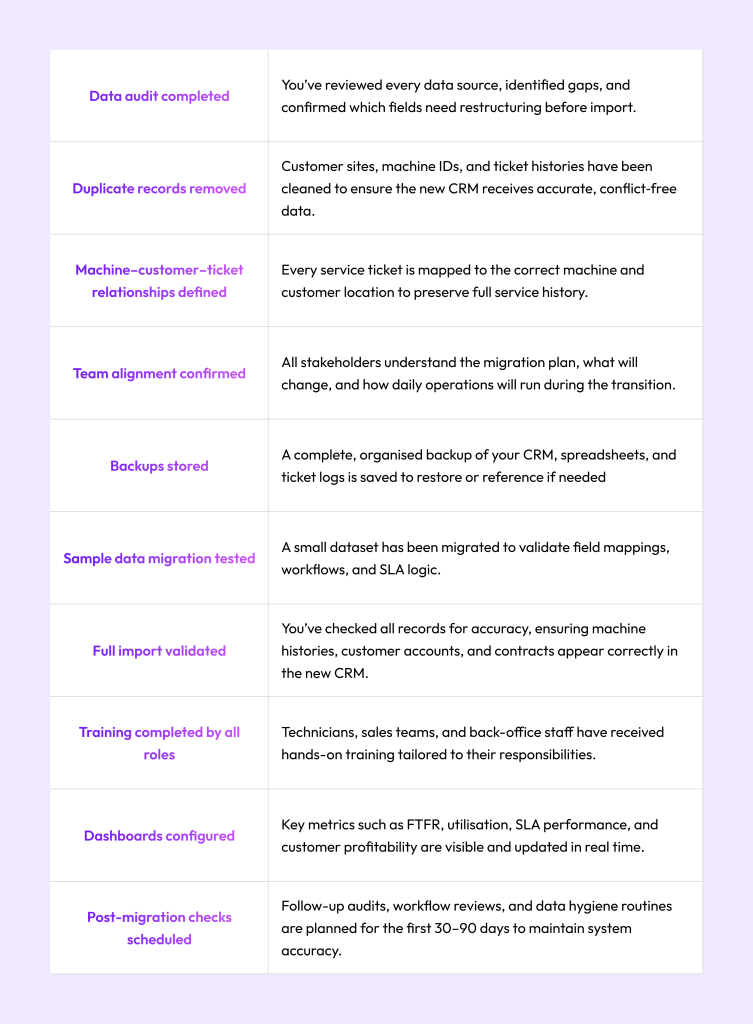
Here’s a simple CRM migration checklist that you can download, keep handy, and share with your team if you’re undergoing or thinking of migrating your CRM.
CRM migration checklist
Low team adoption:
Without proper onboarding and user-specific workflows, your new CRM can quickly become another system people avoid, reducing the ROI of your migration.
Downtime risks:
If teams aren’t given clear instructions on where to update information during the transition, you risk losing ticket data, duplicating work, or causing delays that turn into customer complaints.
Integration gaps:
Telemetry, inventory, payment systems, and route planning tools often don’t sync with generic CRMs. When these systems can’t speak to each other, operators lose the real-time visibility they need for proactive service. Migration becomes even harder when integrations must be rebuilt from scratch.
Workflow misalignment:
Generic CRMs force you into workflows meant for sales teams, not service teams managing machines. Coffee operators rely on SLAs, machine-level histories, parts tracking, and recurring service patterns that generic CRMs can’t support natively. When teams try to “force-fit” their processes, they create manual workarounds that collapse during migration, exposing gaps in routing, ticketing, and machine-to-customer linking.
Data chaos:
This often happens when the machine history, ticket logs, and customer information are spread across spreadsheets. During migration, this fragmentation makes it difficult to create a clean structure, often leading to missing service history or broken machine relationships that take weeks to fix.
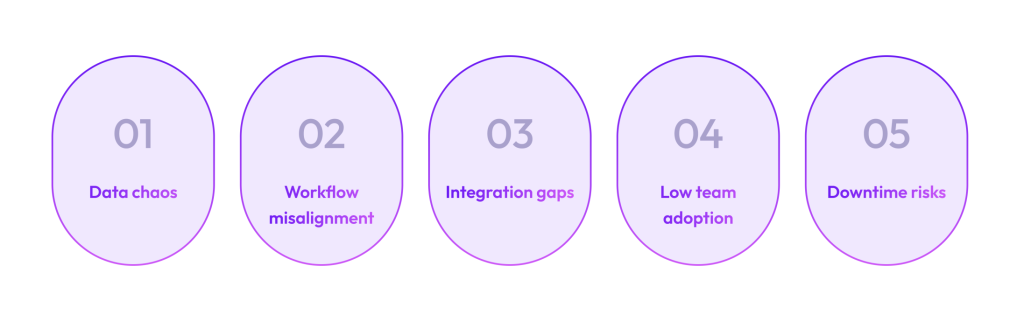
Some of the most common CRM migration pitfalls include data chaos, workflow misalignment, integration gaps, and downtime risks.
5 common CRM migration pitfalls
Connected reporting:
Executives should be able to see customer profitability, churn risk, and operational performance in one place.
Real-time stock and parts integration:
Missing parts create repeat visits. Your CRM should provide real-time stock tracking to fix this.
Route planning and technician visibility:
Look for real-time maps, skill-based assignment, and automatically optimized schedules.
SLA-aware ticketing and customer updates:
The system should automatically prioritise tickets based on contract rules and alert customers with accurate timelines.
Machine-level service history:
Technicians need the full story before stepping into the van. This reduces repeat visits and speeds up resolutions.
Built for high-volume service workflows:
Your system should understand that your customer relationships revolve around machines, SLAs, and recurring visits.
None of the CRM migration steps we listed above will help if you choose the wrong CRM. If anything, you’ll end up losing more time, resources, and money if you pick a generic CRM not built for how you work.
If you’re a coffee machine or vending service operator, here’s what you need to look for in a CRM:
How to choose the right CRM for your service business
Read on to know more about how Dobby can get these results for your business.
Improved technician utilisation
Better customer retention
Higher SLA performance
51% greater operational efficiency
33% higher profitability
Why migrate to a coffee-native stack now
That’s why choosing a coffee-native CRM replaces a patchwork of tools and delivers measurable business outcomes.
Ongoing support:
We stay close after go‑live to help your team get comfortable and solve any early questions.
Fast onboarding:
Our intuitive platform allows technicians, sales teams, and back-office staff to learn the system quickly with clear, simple training.
Smooth migration:
We help organize, clean, and move your data so everything lands in the right place the first time.
Connected reporting:
The system is built around real coffee operations, so your teams don’t need workarounds or extra tools.
Dobby is built for coffee and vending operators. It’s designed around how your teams actually work: machines in the field, busy service schedules, stock to manage, and customers who expect fast responses.
What Dobby brings to your migration:
Dobby: Best CRM for coffee operators with easy migration
Operators using Dobby report up to 15.8x ROI and up to 11% improvement in their operational efficiency.
If you’re ready to move toward a connected, coffee-native CRM and give your team the structure they need to operate with clarity and speed, our team is here to help.
Book a migration consultation with Dobby to get started.
Reduce cost per ticket of your coffee service team
Move your coffee service team off generic CRMs for good
Any Query? We Got You Covered!
FAQ’s
What is CRM data migration?
What should a strong CRM migration strategy include?
What are the best practices for CRM data migration?
How to migrate from one CRM to another?
What should operators know about Salesforce CRM migration?
How to migrate CRM data securely?
How to back up old crm data before migration?
How to prepare your team for CRM migration?
To back up old CRM data before migration, create a full export of all customer, machine, and ticket records, and store it in a safe, organised folder. Keep multiple versions if possible.
What should operators know about Dynamics CRM data migration?
To back up old CRM data before migration, create a full export of all customer, machine, and ticket records, and store it in a safe, organised folder. Keep multiple versions if possible.